
Introduction
The Association of Cricket Statisticians (ACS) is creating a growing collection of historical records, documents, biographies, and archive material including:
- Full digital archive of “Cricket: A Weekly Record of the Game (1882–1914)”
- Digitized ACS quarterly journals from 1973 to 2022
- ACS Cricketers Series with biographical and statistical data
- 6,890 archived research pages by Peter Wynne-Thomas
- Tony Webb Minor Counties Collection included
- + + + ……..
To learn more about the resource, please refer to this Substack Blog: https://acscricket.substack.com/p/our-online-library
We have developed a SEARCH tool, to enable you to find complementary material quickly from across the collection — even without prior source knowledge. The tool enables both comprehensive and targeted searches across all ACS digitised content. Designed to be user-friendly and offering filtering (document type, year ranges) this makes the search process both flexible and precise.
Additionally, and available since December 2025, the search scope has been expanded to encompass the Women’s Cricket History (WCH) website. This is a site that contains (digitised) content from the archives owned by the Women’s Cricket Associates (formerly the Women’s Cricket Association 1926-1998). When invoked, this feature will add matching entries to the list of content found on the ACS site.
Please Note: the first release is limited to searches of the WCH archive of Scorebooks / Scoresheets, we will soon commence indexing the digitised versions of Women’s Cricket Yearbook.
What are the benefits of assisted Searching ?
- Eases the task of finding relevant and connected content across numerous publications and documents, about which you may not have a detailed knowledge.
- Provides flexibility of search, filtering by document type and year range, saving you time and effort.
- You can now easily browse and select required content, not worrying about the source.
- You can search across websites – a single search can encompass ACS hosted Content and (currently) WCH Scoresheet archive thus displaying complementary material encompassing both men’s and women’s cricket.
How do I access Search ?
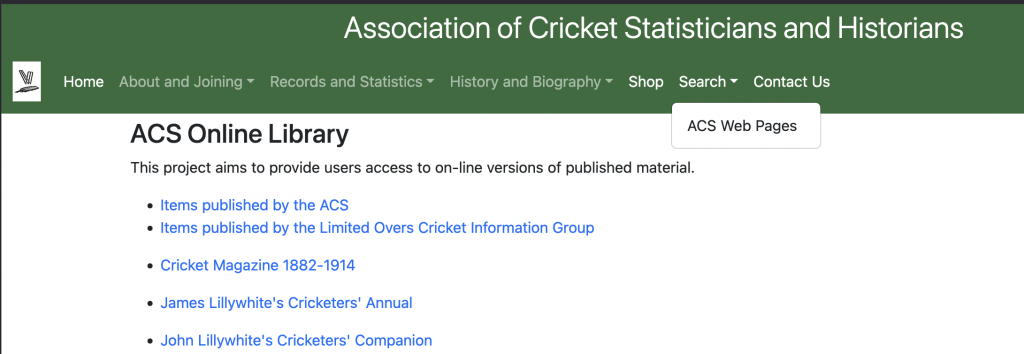
The Search option can only be accessed from the ACS Website, using the main banner of any page.. The following diagram illustrates this, using the ACS Online Library Page:
What is available in the ACS Online Library ?
Selecting ACS Online Library from the Home Menu will display the following screen:
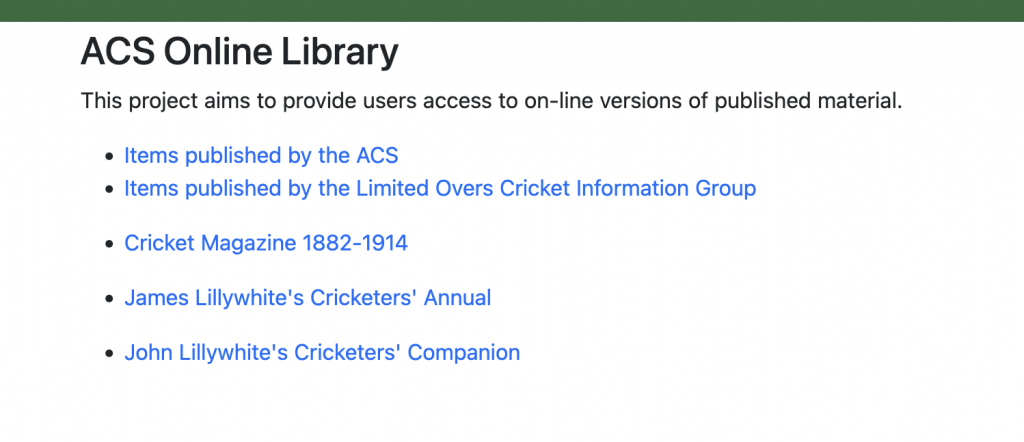
You can see that the site contains a wide variety of digitised publications, including many ACS published titles and titles originally generated by the Limited Overs Group. It also contains other major titles collections and documents, including the full digitised library of Cricket Magazine that was produced between 1882 and 1914 and a growing collection of Lillywhite’s Cricketer’s Annuals. As content is added daily, we recommend re-visiting often.
What is in the WCH Scorebook and Scorecard Archive?
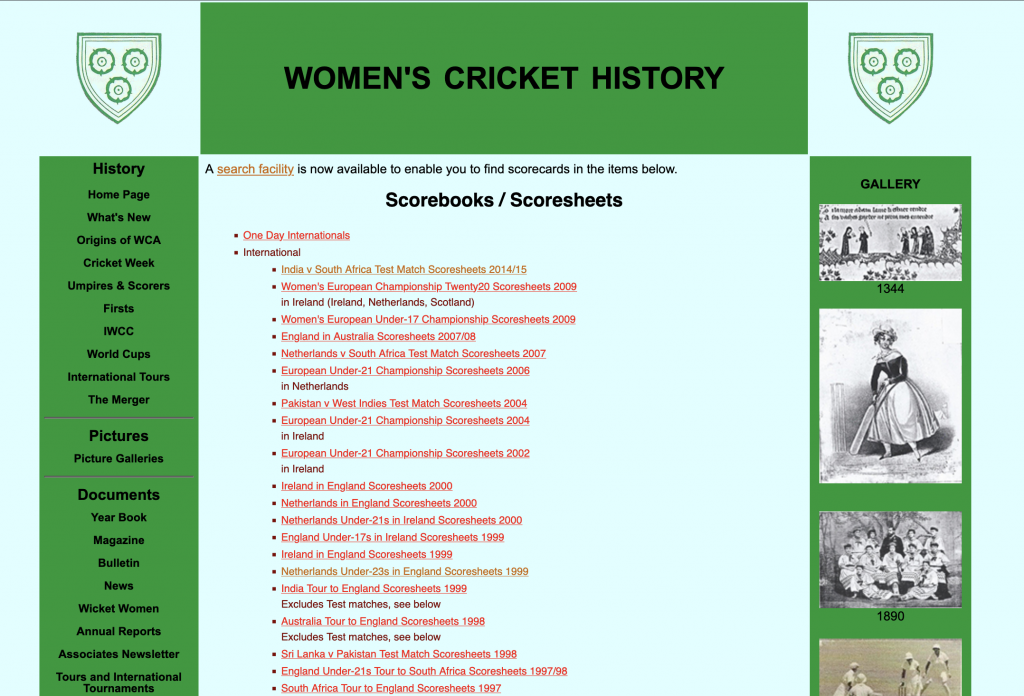
The full WCH Site contains content from the archives owned by the Women’s Cricket Associates; please note the search facility is currently restricted to the ‘Scorebook and Scoresheets’ Archive (we will next begin to index the digitised versions of the Women’s Cricket Yearbook – all editions of which – 1926 to 1998 inclusive – are accessible from the WCH site).
The Scorebook and Scorecard Archive Home Screen, as illustrated, contains material from:
- One Day Internationals
- International Fixtures
- National Fixtures
- Some English County and Club Fixtures
Using the Primary Search Parameters
This is the main data entry screen of the tool:
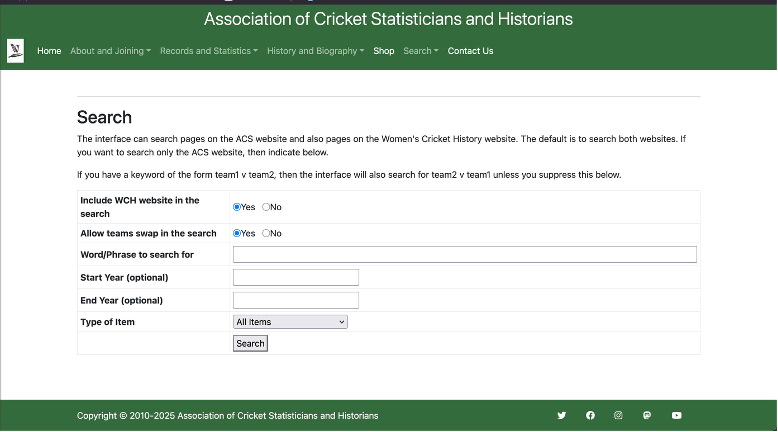
As shown, there are six data entry fields, of which two are mandatory, two are toggles and two are optional – allowing maximum flexibility by use of search parameters, as summarised:
| INPUT FIELD | HOW YOU USE |
| Include WCH in the Search | This field (defaults to YES) – enables you to disable the extended search capability which will incorporate the WCH website. |
| Allow ‘Team Swap’ in the Search | This field (defaults to YES) enables you to disable the ‘Team Swap’ feature. The feature is activated when a Main Word/Phrase is entered in the format ‘team 1 v team 2’. It automatically includes content searches in the format ‘team 2 v team 1’. |
| Main Word / Phrase | This field must be populated with the primary item(s) you wish to search for across the site(s). |
| Start Year | Optional field, allows filtering out results before specified year |
| End Year | Optional field, allows filtering out results after specified year |
| “Type” of Item | This field must be populated, even if left to the default to “ALL Items”. It may be used to restrict the “content type” included within the search, current Options are: – article – award information – biography – coach information – fixture information – ground information – laws – league information – match information – newspaper cuttings – obituary – organisation information – photograph – player information – scorer information – season information – statistics – team information – tour information – umpire information – updates |
Using (Optional) Filters to Improve Searching
Whilst you must confirm / disable both the WCH Site Search and ‘Team swap’ “toggles” and enter your primary Word/Phrase to search, the optional fields may be used (alone or in combination) to apply filters (or search restrictions). This will sharpen the focus of any searches.
To illustrate this, the example below restricts the search to just content tagged as ‘photographs’ with the earliest year of 1980:
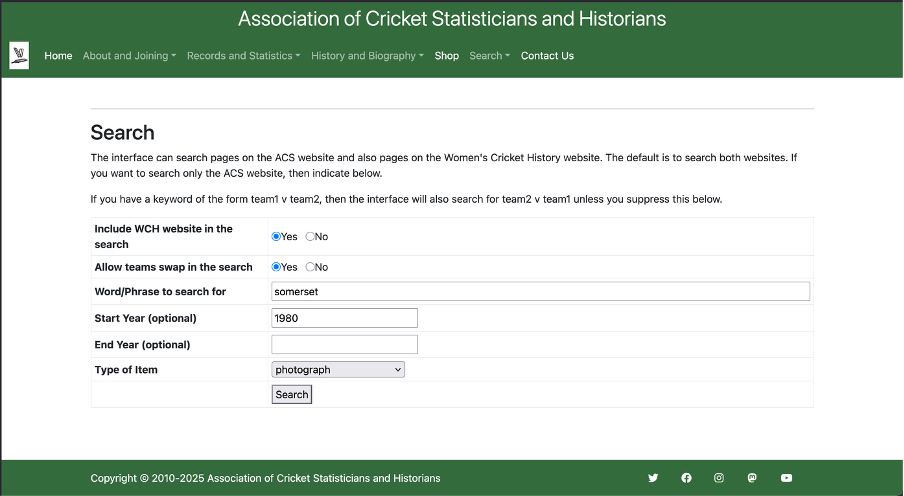
Viewing Results
By simply clicking the ‘Search’ button, your search will be processed based on your selections and any matching entries – later, we cover how the tool suggests ‘matching alternatives’ using synonyms and the ‘team swaps’ feature.
For now, in this example, we have searched for content tagged ‘Surrey’ with no optional filters set. The Results Screen will look like this:
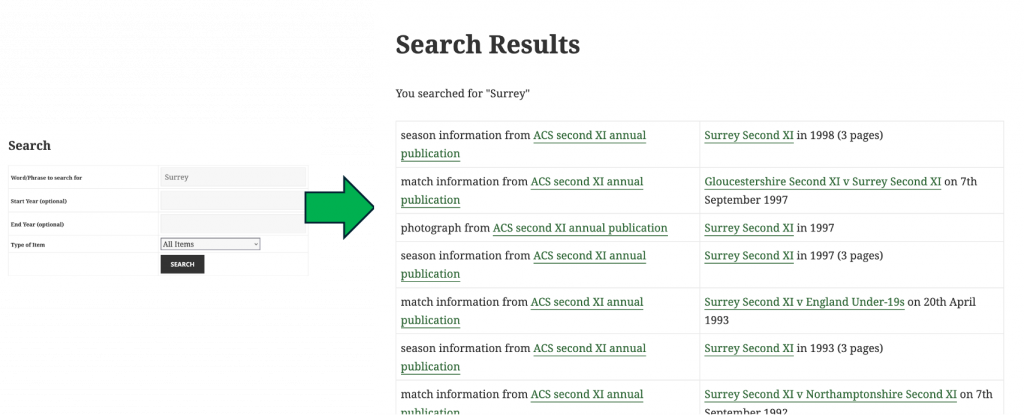
All matching entries are displayed from the indexed source files, starting with the most recent. It is possible to simply scroll down (and back up) to view and ultimately select the content you wish to browse from all those available.
Viewing Filtered Results
Using the optional fields, filters may be applied to narrow search criteria. To develop our previous example, to search for content still tagged Surrey but only those articles, scores, photos etc dated between 1890 to 1910, we set those years as your start and end filters:
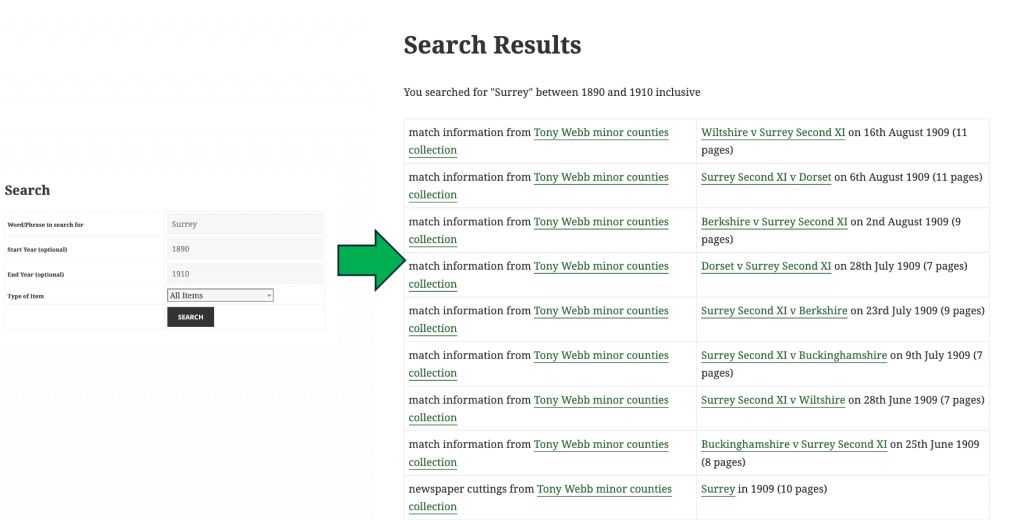
Confirming the search criteria, results are displayed listing all entries from content that, this time, matches your filtered selection – still with the most recent appearing first. There may still be numerous results, so you can scroll down (and back up) through them to choose the content you wish to browse.
Browsing Content
Selecting and browsing content is again simple. Clicking a ‘link’ from one of the Search Results, will display the content / publication selected, opening at the relevant page in a new window, as illustrated.
Note: you can navigate freely through the publication / content and in some publications use in-document searching for complementary material.
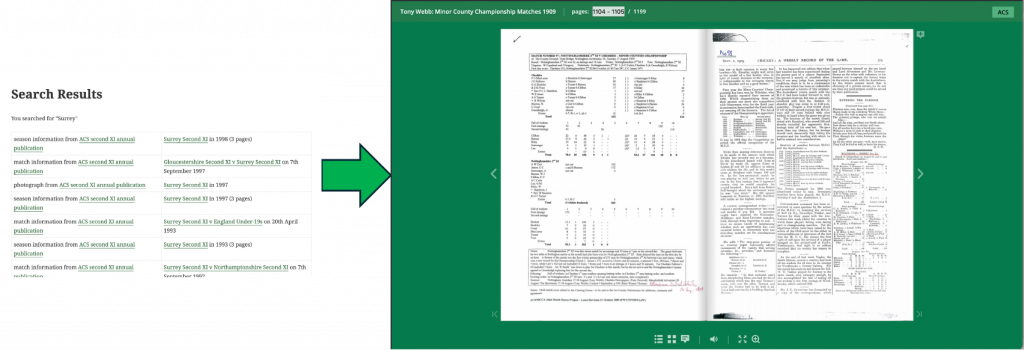
When you have completed your browsing of the content, clicking the “ACS” block will return you to the main ACS website.
Alternatively, you can close the window and choose to either select different content from the Search Results or to start an entirely new search.
Understanding Matching Alternatives – Synonyms
As within any traditional library, different authors and publications may have used various terms to refer to the same items. To address this, we have included the concept of ‘matching alternatives’ which, when available, are also displayed in the Search Results screen.
To illustrate this, let us assume
- We have used “Notts” as our ‘Main Word / Phrase’. It may be that we would benefit from also seeing matching content is available but was defined using “Nottinghamshire”.
- Similarly, we may have used “2nd XI” in the ‘Main Word / Phrase’ field and again would benefit from seeing what matching content is available but was defined using “Second XI”
The feature will therefore return a series of results based on both the phrase you input but also from a pre-defined set of synonyms (matching alternatives) as illustrated:
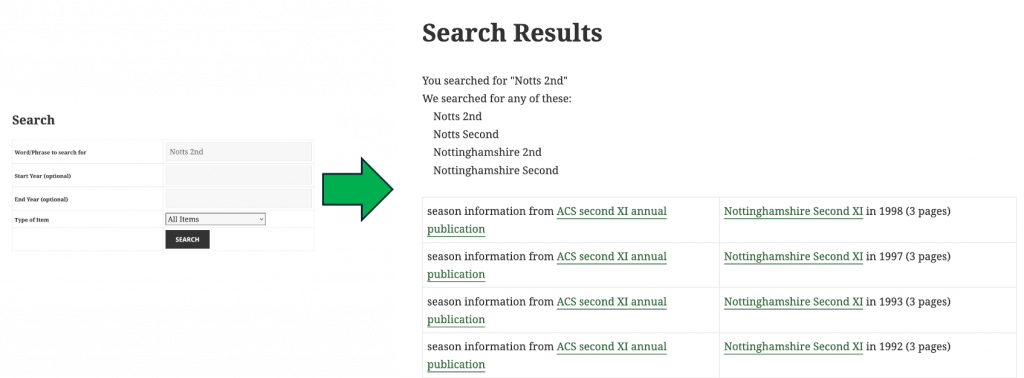
In our example we searched for “Notts 2nd XI” HOWEVER note what happens ….. the tool will search/display not only records that match out entry, but it will also search/display for any matches that have been pre-defined, including similar words or phrases, e.g.:
- Notts 2nd
- Notts Second
- Nottinghamshire 2nd
- Nottinghamshire Second
You may still add filters (as outlined above) to focus or narrow the search. You may also scroll the results screen to view and select publications from the expanded content set.
Understanding Team Swap in Searches
SEARCH is designed for maximum flexibility of entries and to return the broadest possible set of Search Results, allowing you to narrow the focus as needed. With the ‘Team Swap’ feature, entering a “Word/Phrase to Search for” in the format of team1 v team2 will also automatically show matches in the format team2 v team1.
To illustrate this, consider this next example that assumes England v Australia is our Word/Phrase.
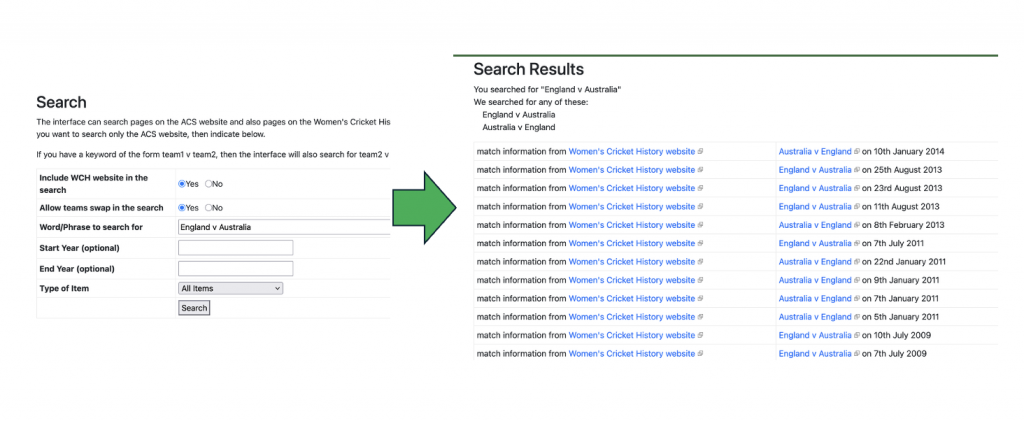
We searched for “England v Australia” HOWEVER note what happens ….. the tool retrieves records that match both our entry and the reverse, e.g.:
- England v Australia
- Australia v England
This will provide access to content that may have been entered in either format – perhaps to represent matches at an alternate / reverse venue.
You can still add filters (as previously described) to refine the search. It’s still possible to scroll the results screen to view and select publications from the expanded content set.
Remember, this feature is enabled – by default – unless you choose to disable every time a search “Word/Phrase” is entered in the specified format.
Advanced Searches – Understanding “Fuzzy Searches”
In addition to the flexibility provided by Matching Alternatives and Team Swap, SEARCH contains an advanced search technique known as “FUZZY SEARCH” is incorporated.
Computer Scientists define this search technique as being “[…..] designed to handle typos, misspellings, and minor variations, returning results based on “likely relevance […..]”.
To invoke, you simply add the % character to the Main Word / Phrase within field used to define your search criteria. To illustrate this, consider this next set of examples:
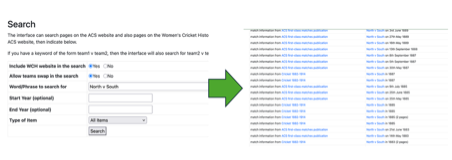
Using North v South as our Word/Phrase:
Standard Searching with Precision
The tool retrieves records that match our predominantly match our entry (circa 117 entries at time of writing)
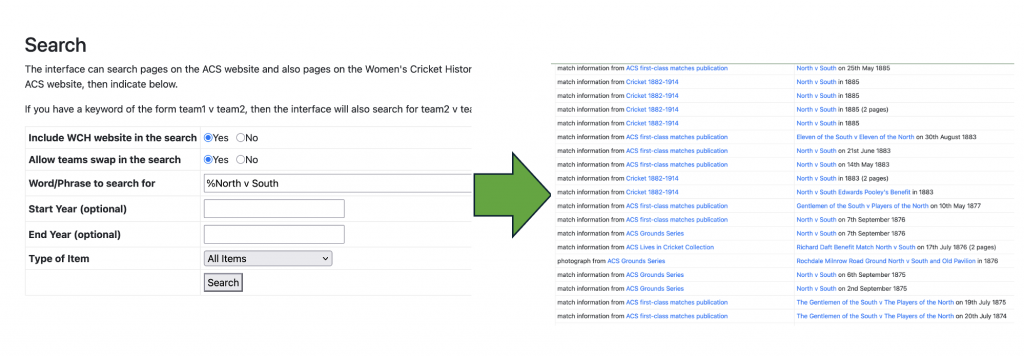
If we now use %North v South as our Word/Phrase:
A singular Fuzzy Search
The tool retrieves a larger set of records with including entries such as Gentlemen of the North (circa 145 entries at the time of writing), for example this includes entries labelled as “The North”.
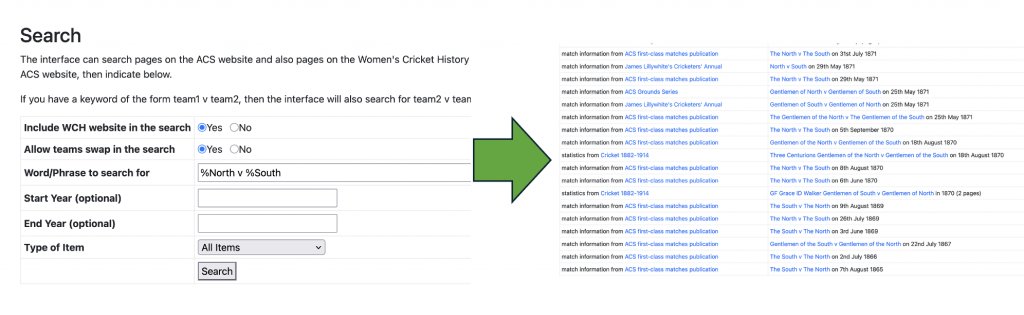
To continue, if we now expand our Word/Phrase further and use %North v %South:
A Combined Fuzzy Search
The tool retrieves an even larger set of records with less precision (circa 227 entries at time of writing) – upon which you may use filters, as previously described, to narrow the focus. Working in this order (i.e. Start by undertaking a ‘Fuzzy Search’ and then apply filters to narrow your focus, as appropriate) may result in less risk of missing records.
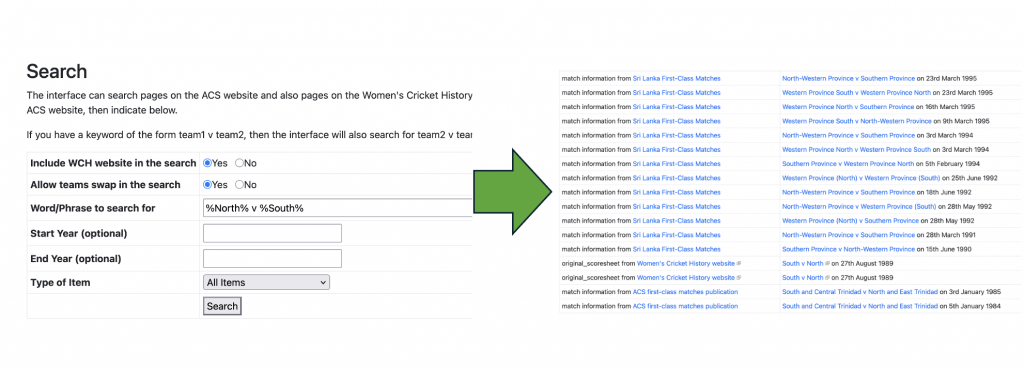
Next, we use %South% v %North% as our Word/Phrase:
An Advanced Fuzzy Search – Minimal Precision
The tool will retrieve an even less precise set of entries (circa 330 entries at the time of writing), overcoming spelling issues and providing a large base set of entries to work with and filter down as appropriate.
Some additional examples:
- If we use %A&Shaw% as our
Word/Phrase:
SEARCH will return entries including both A Shaw’s XI and Alfred Shaw’s Team
- If we use %Philadelphia% as our
Word/Phrase:
SEARCH will return entries including both Gentlemen of Philadelphia and Philadelphians
Thus, and as briefly shown, divergent entries contained across publications are retrieved and displayed for you to process further.
- It is also possible to use this technique applying the Fuzzy character
(%) in the middle of a phrase, as shown in these examples.
- If we use %CI%Thornton% as our
Word/Phrase:
SEARCH will return entries including ‘Mr CI Thornton’s Team’ – removing the need to remember or even know about entering a title.
- If we use %CI%Thornton% as our
Word/Phrase:
- If we use %Ivo%Bligh% as oiur
Word/Phrase:
SEARCH will return entries including ‘The Hon Ivo FW Bligh’s Team’ and ‘Hon. Ivo Francis Walter Bligh” – you do not need to know on first pass any of his middle names nor remember (of know about) his title.
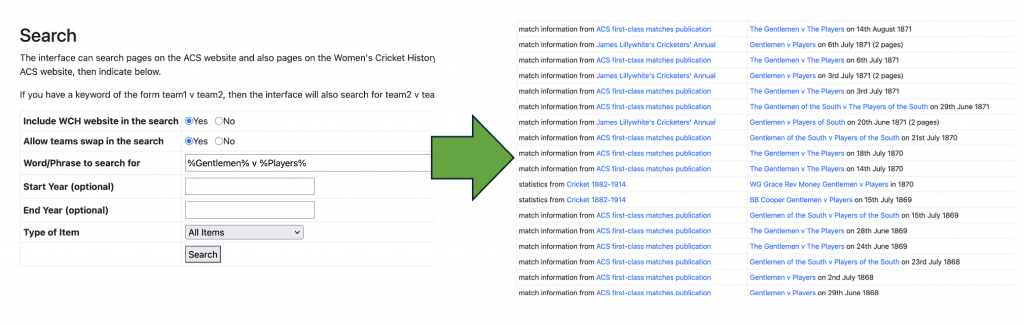
A final use case based on a common search, if we use %Gentlemen% v %Players% as our Word/Phrase:
A second Advanced Fuzzy Search – Minimal Precision
SEARCH will return a list containing many variations from the many different of ‘Gentlemen v Players” matches played including:
Sixteen Gentlemen v Players of the North
The Gentlemen of the South v The Players of the South
The Gentlemen v The Players
WG Grace Rev Money Gentlemen v Players
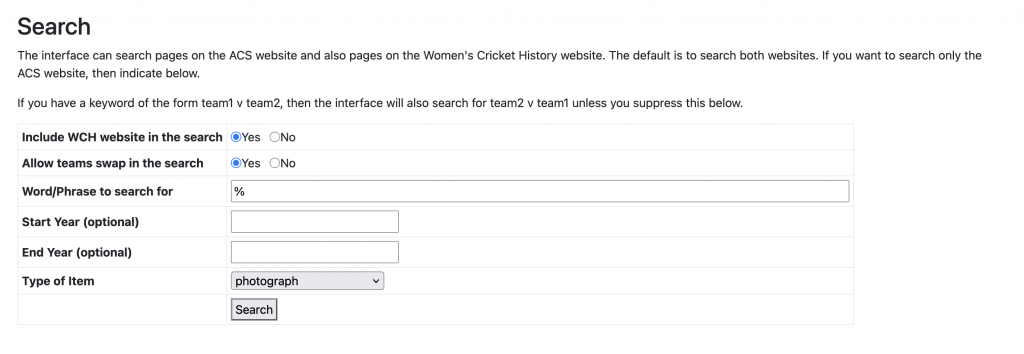
There is one other “extreme” use for Fuzzy Search, that you may wish to consider, where you would like to understand just what is available to you.
As shown, entering just the Fuzzy Seach Character (%) will return a full (optionally filtered) listing of all of the entries with no precision.
Whilst available, this may be used with caution because (at the time of writing) the search illustrated (i.e. ‘show me all photograph items available’) returns 3044 items, whilst other types of item have even more entries, for example ‘show me all match information’ returns 38790 items.
Using Fuzzy Search to list all items (filtered for Photographs) – No Precision
This does, however, serve to demonstrate the breadth of the collection available for you to browse – if you have no perspective – BUT there could be a very large list to process !!!
In summary, use of the Fuzzy Character (%) enables SEARCH to look beyond the possibly erroneous, literal entries rather returning entries that are similar – in terms of spelling, meaning, or other criteria. This may assist users who are unsure of a specific spelling (Team, Ground, Player) and provides a safety net should there be a misspelling within the master Word/Phrase or the publication indices to be searched.
Frequently Asked Questions
- Who can use the Search to access online content ? Our ACS Website is open to everyone, with no paywall for any feature. If you’re interested in joining our association, more information is available on the site.
- Do I need a separate access to the WCH Site ? No, whilst this is a separate website, it is again open to everyone. Hence you will be able to seamlessly access content – it may be that you don’t even realise which domain you are drawing the content from !
- What content is available ? The website continues to grow as volunteers digitise further material. Today, it features ACS published books and The Cricket Statistician (complete issues over three years old). You will also find many non-ACS books and materials from individual collections, including contributions from the Limited-Overs Cricket Information Group, Peter Wynne Thomas, and other leading cricket historians and statisticians.
- Will the Search tool return all entries? The tool will display all available entries in its database, which is continually expanding as volunteers digitise more publications. Be aware that whilst much content is already included that more will be added over time.
- How do I get help? By email using the ACS Contact details on the Website – a volunteer will respond as soon as possible.
- What other educational support is available? We’ve created several short videos covering key topics, which you will soon be able to find on our YouTube channel.
- What is the Cricket Magazine ? ACS have created digitised issues of Cricket Magazine (1882–1914) making then available to all for free. The search database is now being extended to include all of these editions to facilitate easier searching, displaying available content including results summaries, articles and scorecards from various matches—check back for updates or consider contributing to this effort.
- How can I help? This volunteer-led project welcomes your support in various ways. Firstly, as you use the tool please report any errors in the index (like incorrect page numbers or search mapping issues). Secondly and just as importantly, would you consider assisting with our ongoing efforts at digitising content and/or expanding indexing content (by collecting and inputting key index data into our pre-defined spreadsheet) to enhance this valuable resource for cricket historians and statisticians around the world in the years to come.
This Revision: May 6 2026, to add information on Fuzzy Search
Previous Versions: Initial Release December 2025